

A Koombea app since 2008
Type it the way you write it.
Kalculator takes whole expressions, brackets and all, and answers as you type. It saves every calculation and syncs it across your devices. It has been on the App Store since the store's first days, and it is the app we break first.

Free. Requires iOS 18.6 or tvOS 18, or later.
Since 2008
The app we break first.
Kalculator went up in the App Store's first days, under a personal Apple account, because Koombea's company account was not ready yet.
When the company account came through, we built the listing again from nothing and shipped it a second time. Apple had no way to move an app between accounts yet, so there was no other route. That second listing is the one still live today.
It has never been the product that pays the bills. It is the one that goes first. We try every language, framework, device and process here before we try it on a client, because the only launch date at risk is our own.
A calculator is small enough to rewrite and real enough to ship. That is exactly what makes it a good place to be wrong.
The test bed
Eighteen years of first builds.
Each version carried something we had not shipped before. The list is the short version.
The first days
Objective-C, and a store nobody had shipped to
There was no precedent for any of it. Submission, review, pricing, updates. Kalculator is how we learned what shipping to the App Store actually involved.
The company listing
Built twice, on purpose
We rebuilt it and submitted it again under Koombea's own account. Apple had no way to transfer an app between accounts at the time. A second launch of the same product, with the first one's lessons already in hand.
Theme packs
In-app purchase, 48 themes, seven packs
Our first paid content in a free app. StoreKit, receipts, restores, and the long tail of what happens when a purchase does not go through.
New screens
Watch, TV, the Today widget, and a keyboard
We put Kalculator on watchOS and tvOS, in Notification Center, and shipped Kalcboard, a calculator keyboard that worked in any app. Four new surfaces, none of them with a client waiting on the result.
Kalculator 5
Swift, SwiftUI, SwiftData, WidgetKit
A full rewrite with no third-party dependencies. Decimal arithmetic in place of floating point, SwiftData and CloudKit in place of the old store, and every theme rechecked against a 4.5:1 contrast floor.
Kalculator 5.1 and 5.2
Foundation Models, App Intents, and a screen that folds
Convert reads a request with exact rules first, and hands Apple's on-device model only what the rules miss. App Intents put Kalculator in Siri, Shortcuts and Control Center. The layout reads the system's fold region on iPhone Duo, and the Apple TV app is rebuilt from the same SwiftUI code as the iPhone one.
Kalculator 5.2
What is in it.
Answers that are actually right
0.1 + 0.2 is 0.3. Kalculator does exact decimal arithmetic instead of binary floating point, so the number you carry into the next calculation keeps every digit it started with.
Whole expressions, edited in place
Type (84.5+23.75)×1.08 the way you would write it and watch the answer move as you go. Tap to put the cursor mid-expression, double-tap to select a number, and fix one digit without retyping the rest. Paste a price like $1,234.56 straight in.
Percent, powers and roots
A row of √, xʸ, % and ± sits above the keypad. Percent works the way a pocket calculator does, so 200 + 10% is 220. A whole power such as 1.05^3 comes out exact, to the last digit.
Convert any number
Tap Convert, or hold any number, and say what you need: "lb to kg", "USD to EUR", "15% tip", "split 4 ways". Kalculator does the arithmetic itself, in exact decimals. It keeps the day's exchange rates for when you are offline, and your amounts never leave the device.
History that follows you
Kalculator saves every calculation, dates it, and syncs it through iCloud across iPhone, iPad and Apple TV. Search it, tap a row to drop its result into what you are typing, or delete a row and undo it. Export the whole tape as text.
49 themes, all free
Every pack, including the ones that used to cost money, now ships with the app. Each theme brings a matching home screen icon. Nothing locks, and nothing costs extra.
Widgets, controls and Siri
Latest Result keeps your last answers on the Home Screen or the Lock Screen. The large Calculator widget is a working keypad, and it hands its calculation to the app when you want the full screen. Kalculator and Convert sit in Control Center, and Siri answers to "Calculate with Kalculator".
Laid out around the fold
On iPhone Duo, no key sits on the crease. Opened like a book, history is the left page and the calculator the right. Turned, the keypad moves below the fold.
Readable by everyone
Text clears 4.5:1 against its background in all 49 themes, and graphics clear 3:1. VoiceOver moves the cursor and reads results. Kalculator honors Dynamic Type and Reduce Motion. It is in English and Spanish.
The app
Six screens.
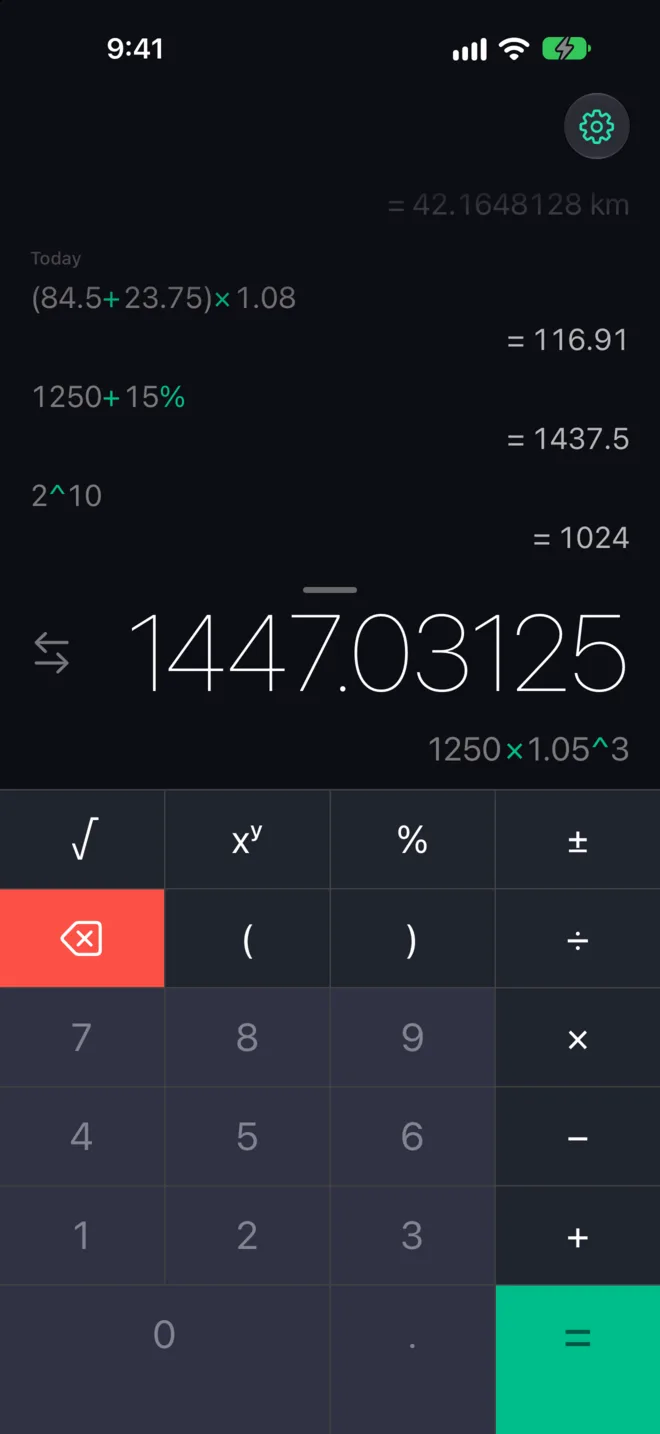
The main screen. Past calculations above, the live answer below. 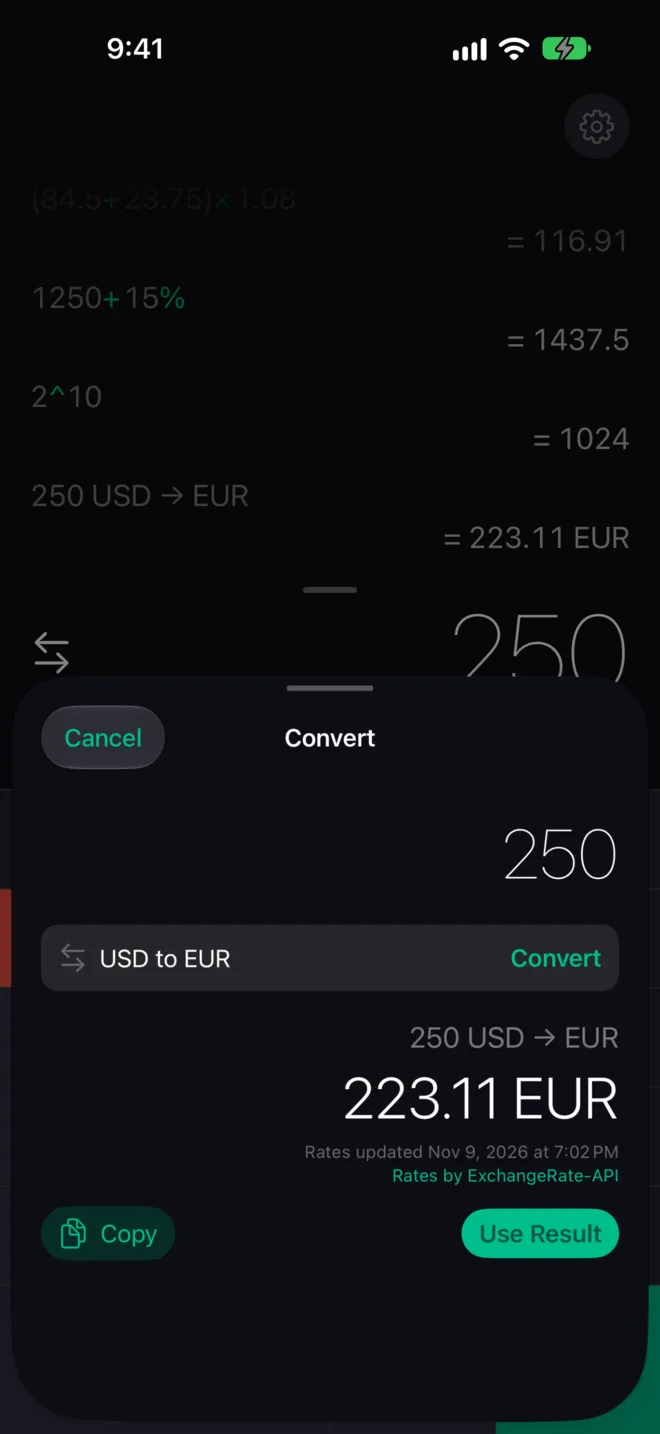
Convert, with the date and source of the day's rates. 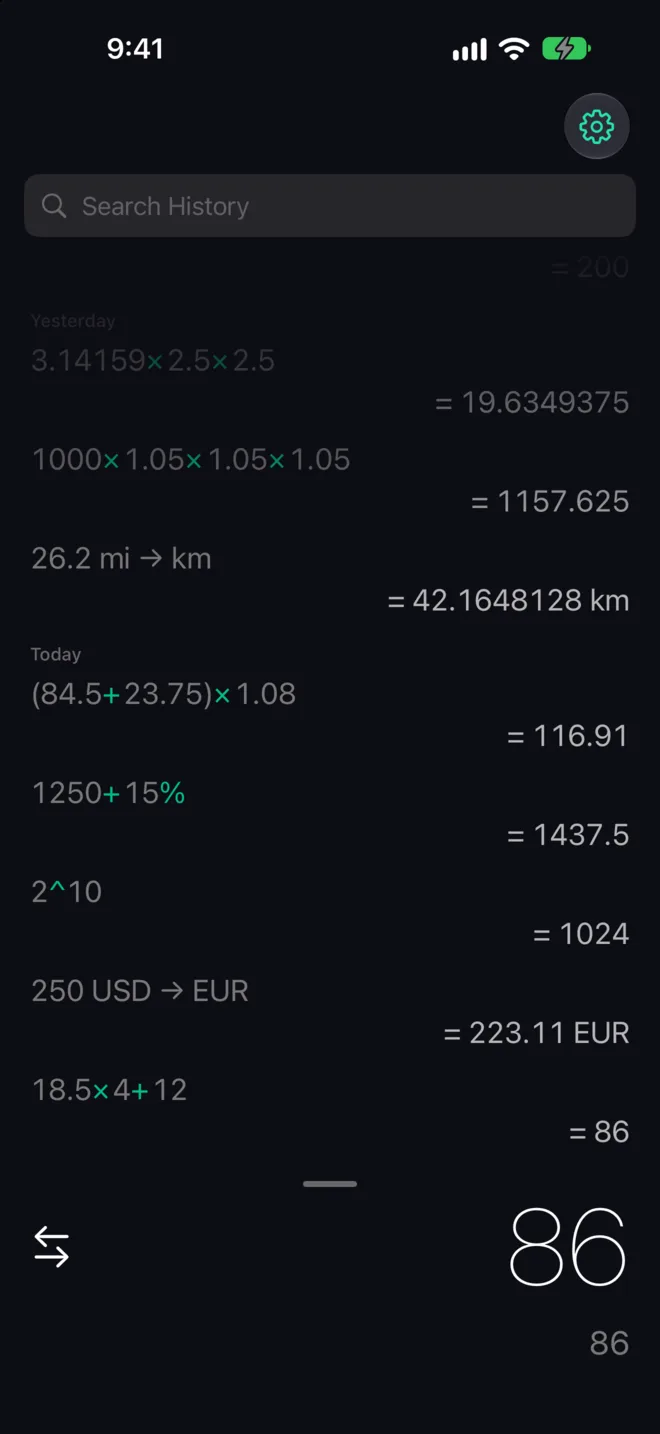
Drag the display down for history, dated and searchable. 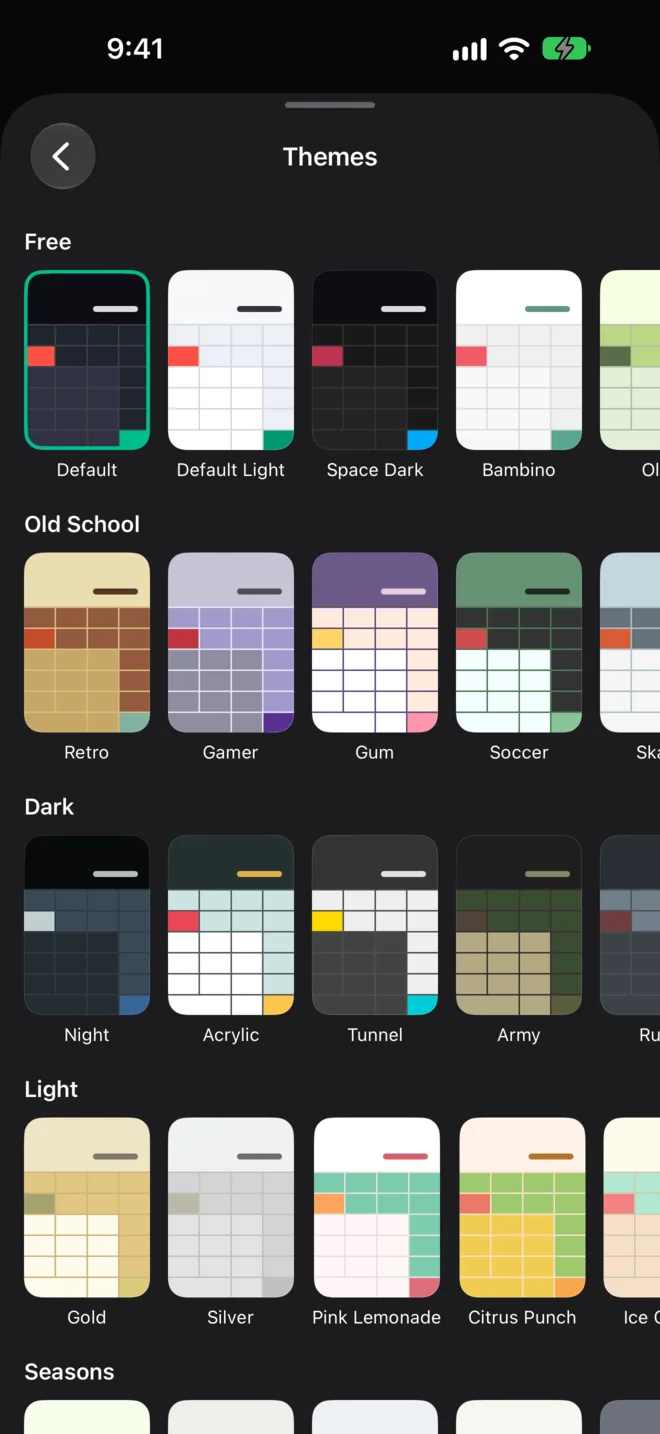
49 themes in eight packs, every one included. 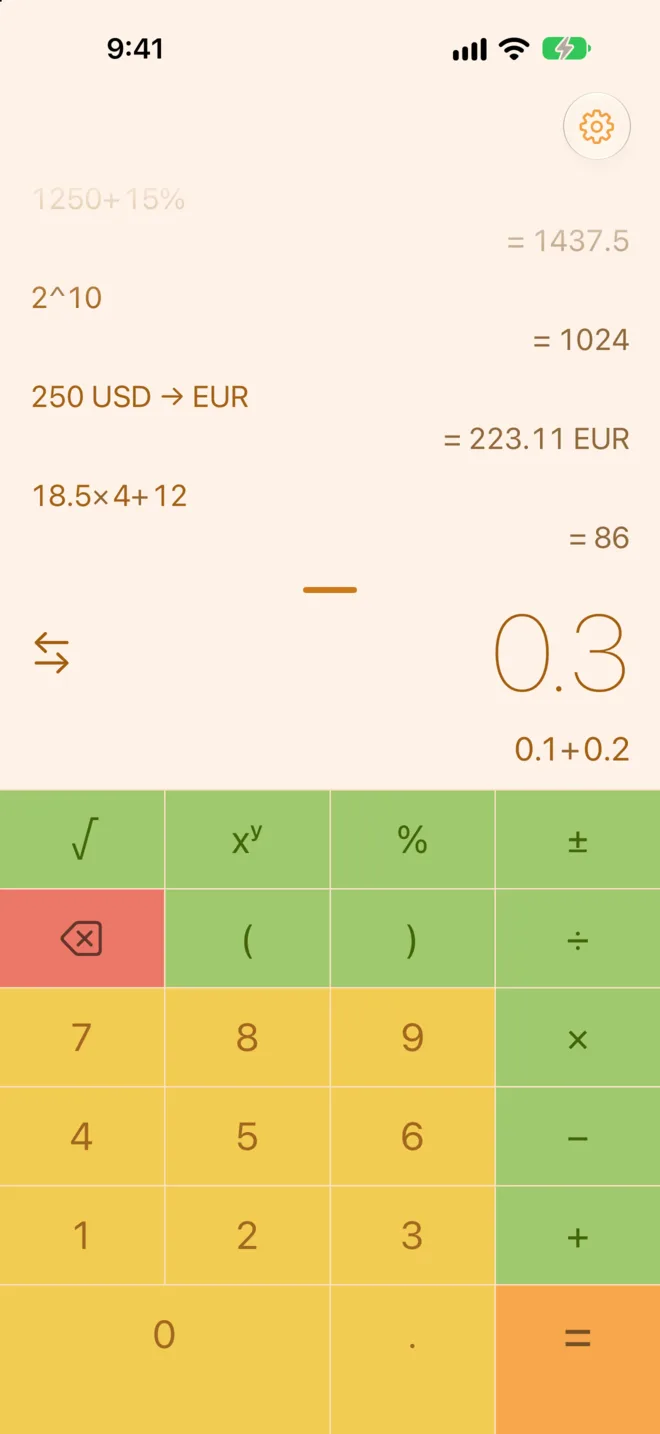
Citrus Punch, from a pack that used to be paid. 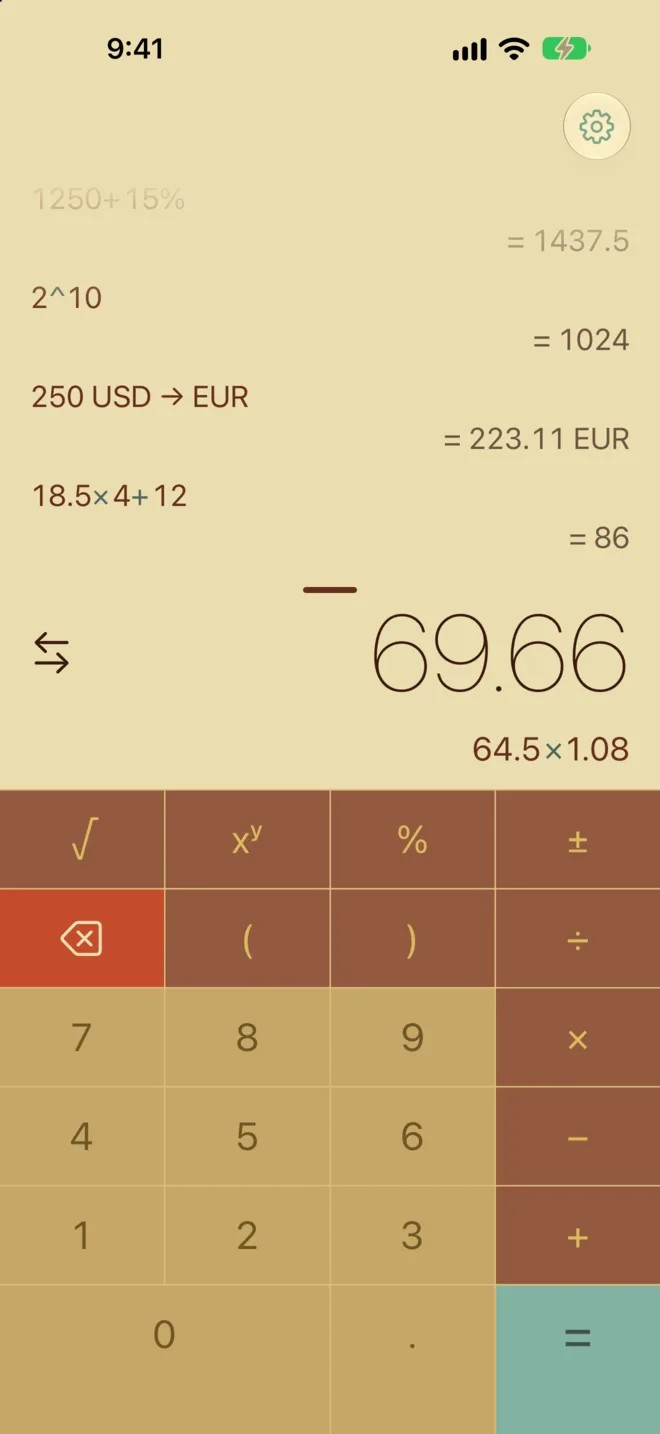
Retro, from the Old School pack.
On iPad and Mac
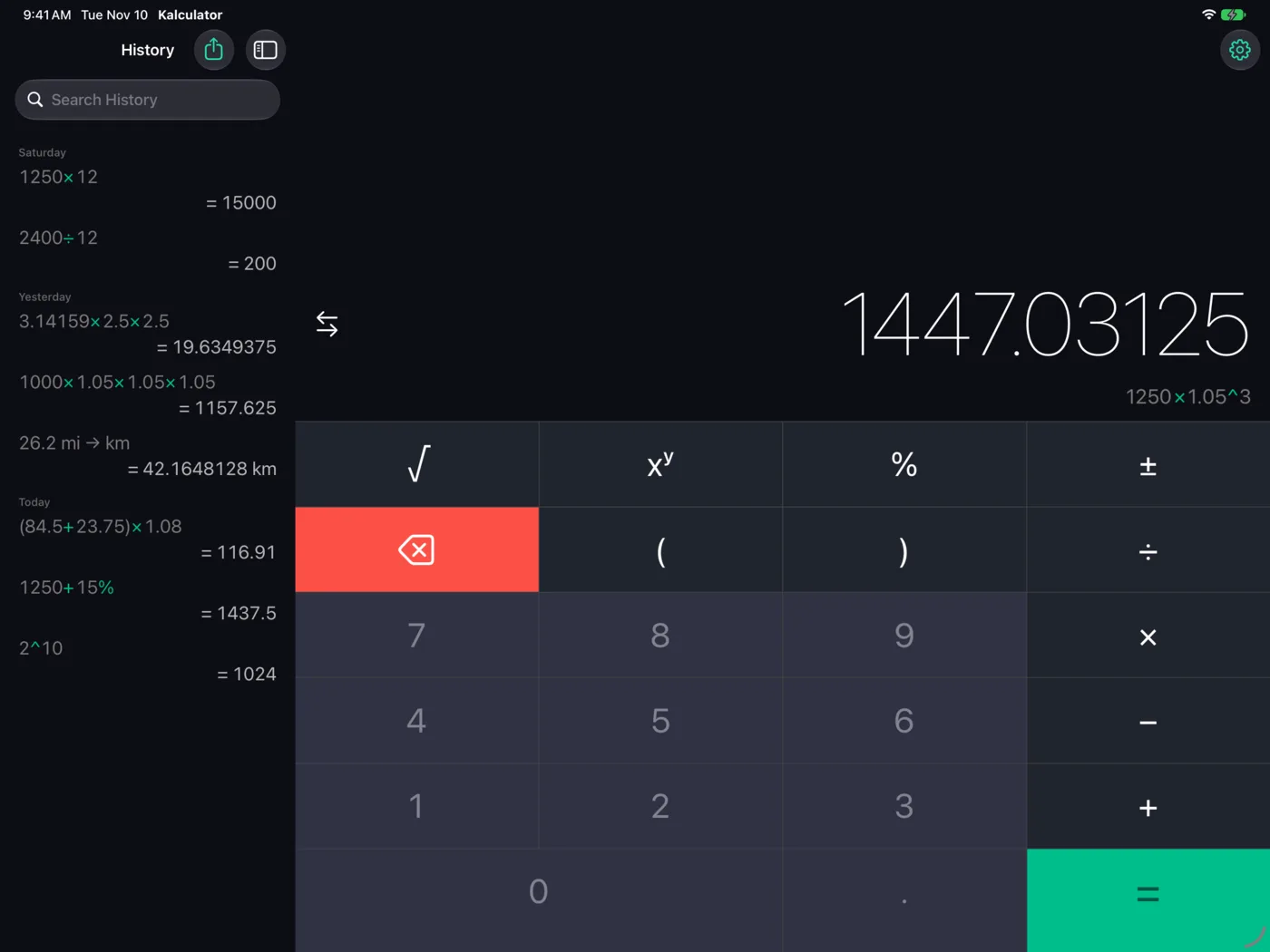
History moves to the sidebar.
The same app, laid out for a bigger screen. History sits beside the keypad instead of over it, with its search field at the top. A hardware keyboard types and edits, and the arrow keys move the cursor. Kalculator also builds for Mac Catalyst.
New in 5.2
On iPhone Duo, no key sits on the fold.
Open iPhone Duo and Kalculator lays itself out around the fold. Opened like a book, history is the left page and the calculator the right. Turn it so the fold runs across, and history and the answer sit above it with the keypad below. Closed, the outer display works like any iPhone.
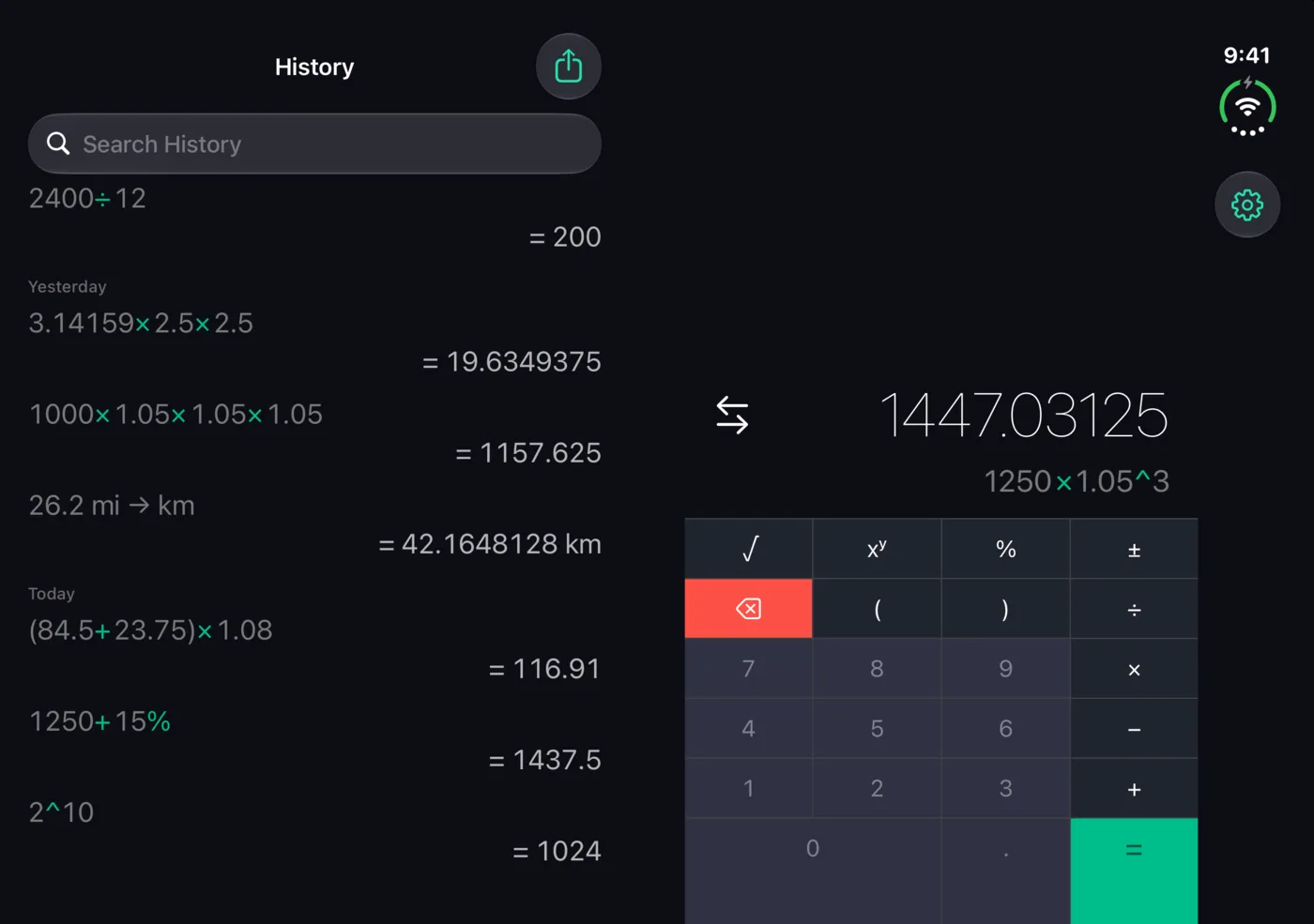
Opened like a book. History on the left page, the calculator on the right. 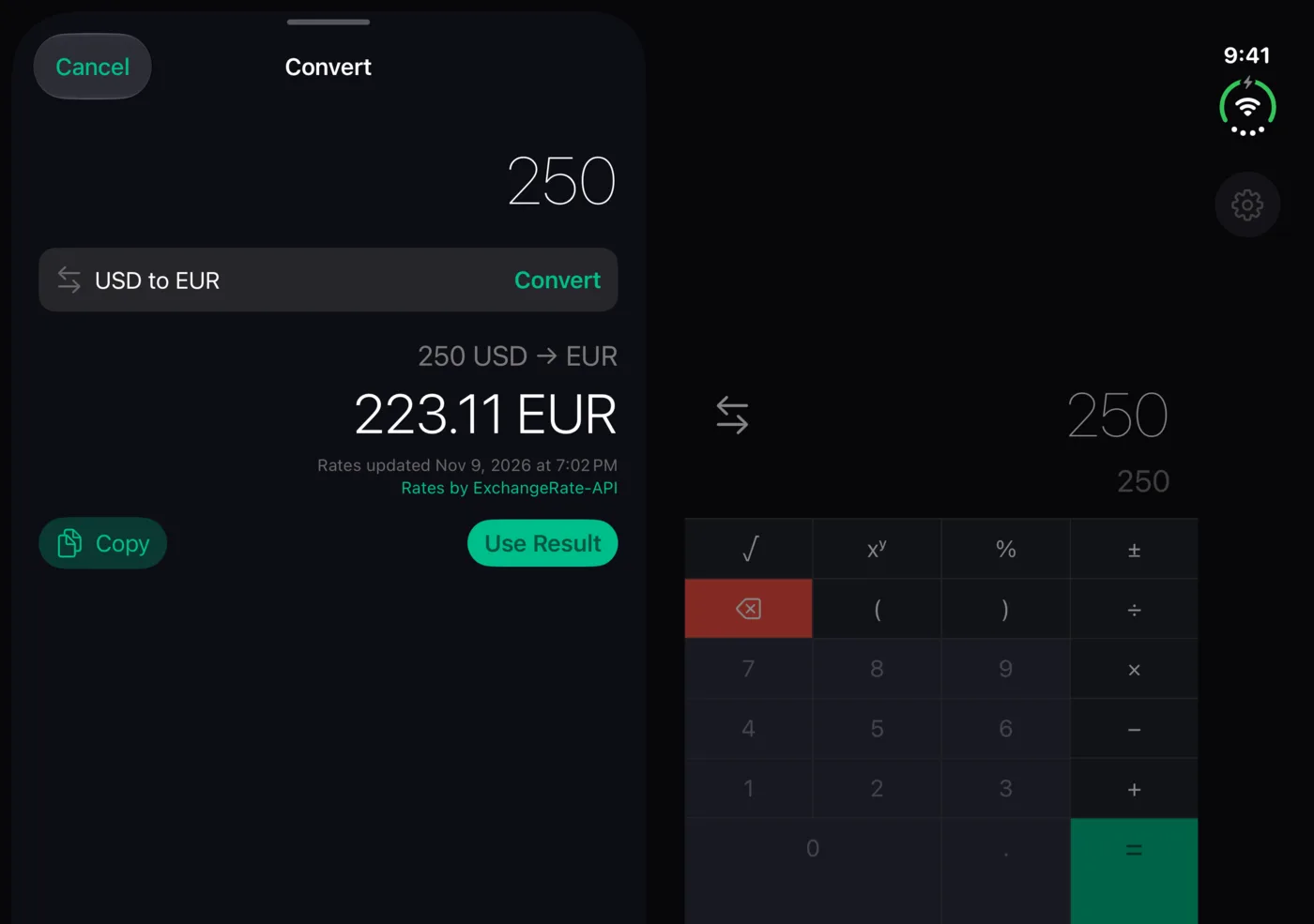
Convert on one page, the calculation still open on the other. 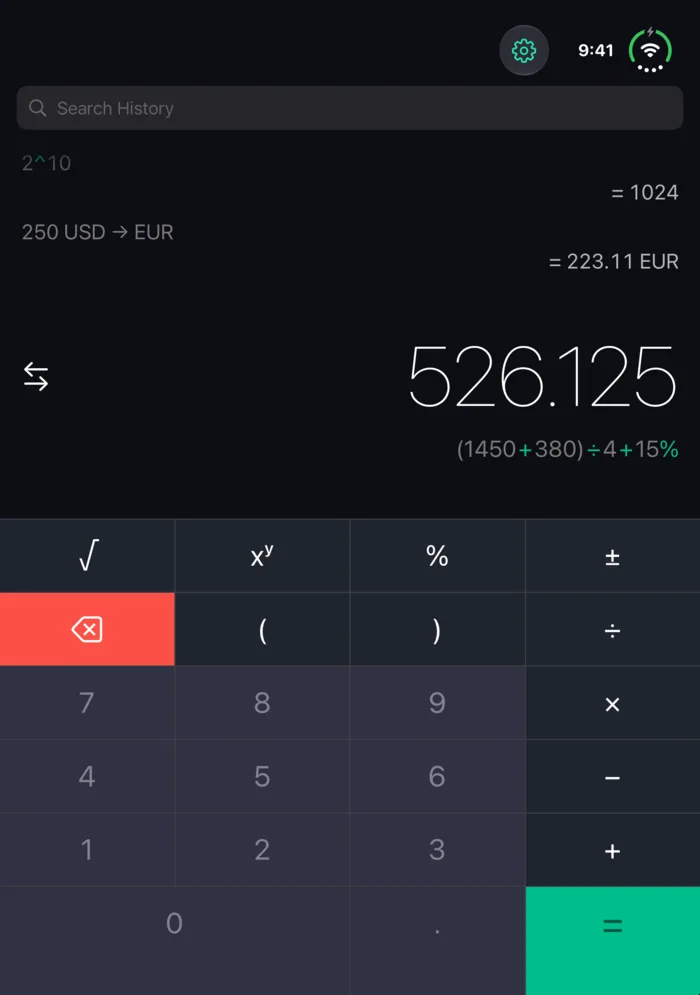
Turned. The keypad moves below the fold.
On Apple TV
Rebuilt for the big screen.
The Apple TV app from 2017 is replaced by one built from the same SwiftUI code as the iPhone app. It has the new keys, Convert with currencies, all 49 themes, and history synced through iCloud with your iPhone and iPad. Play/Pause is =, and a keyboard types directly.
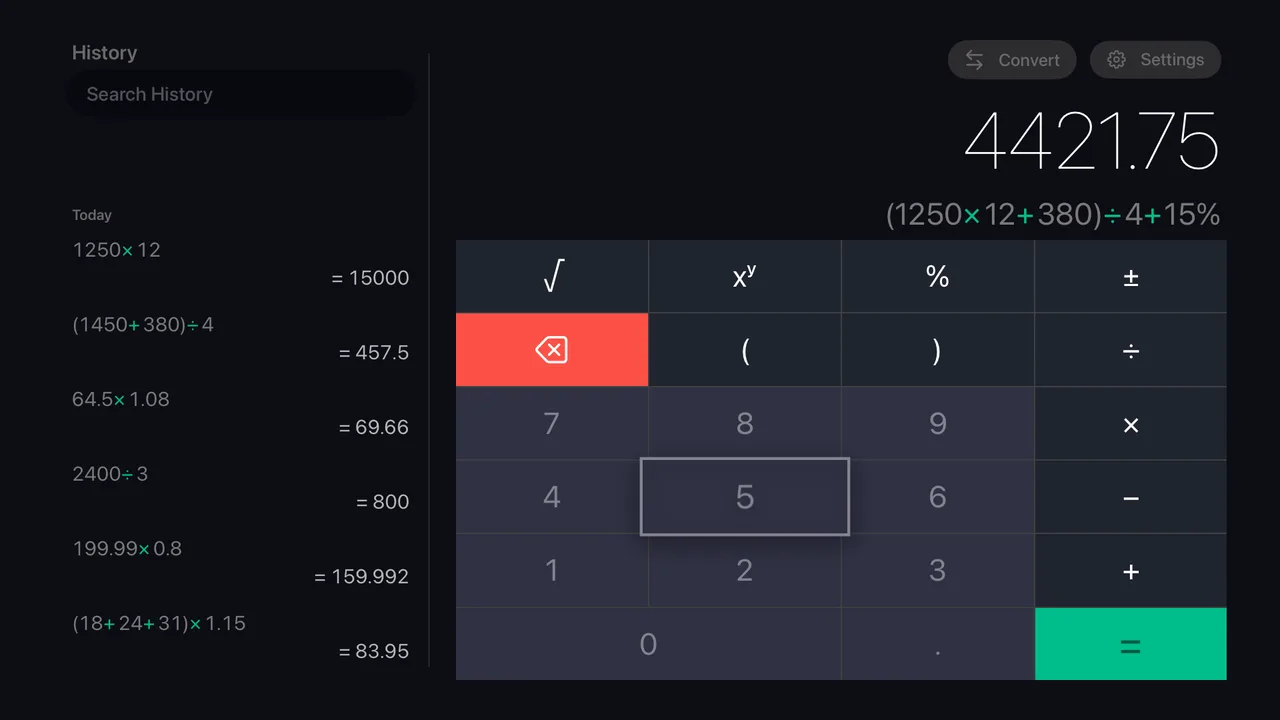
History on the left, and the remote's focus on the keypad. 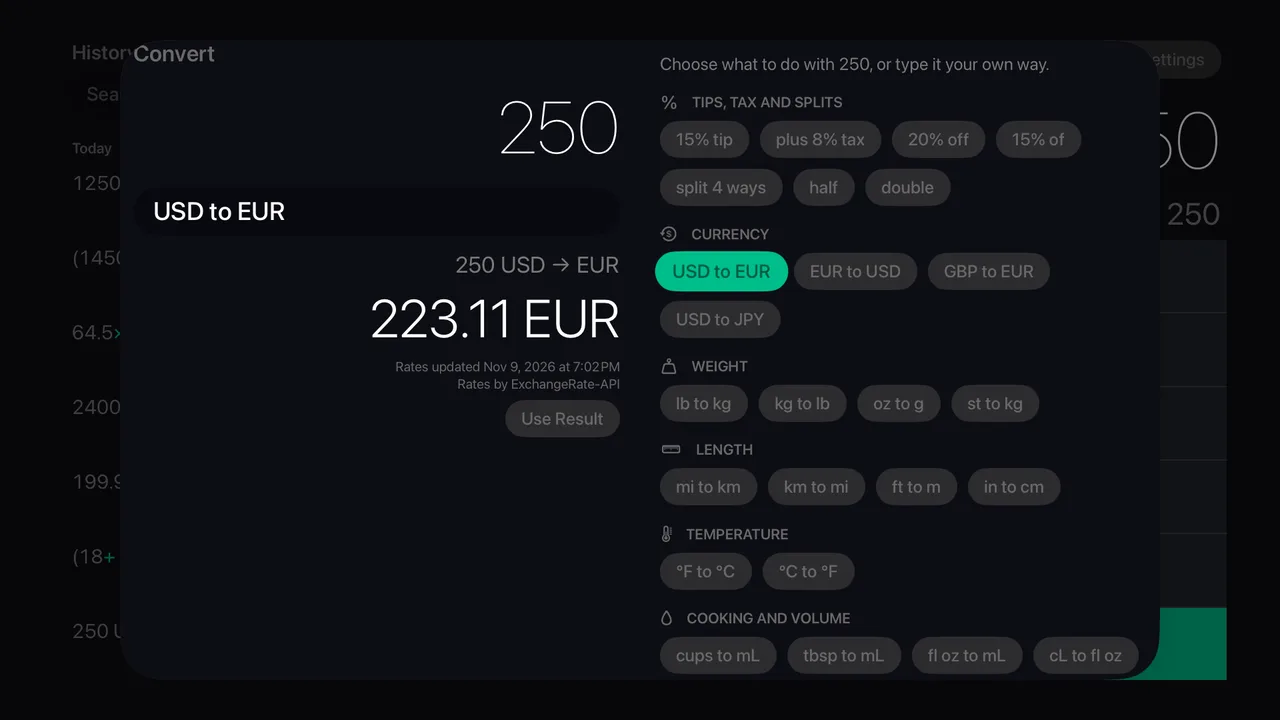
Convert, with examples to pick from by kind. 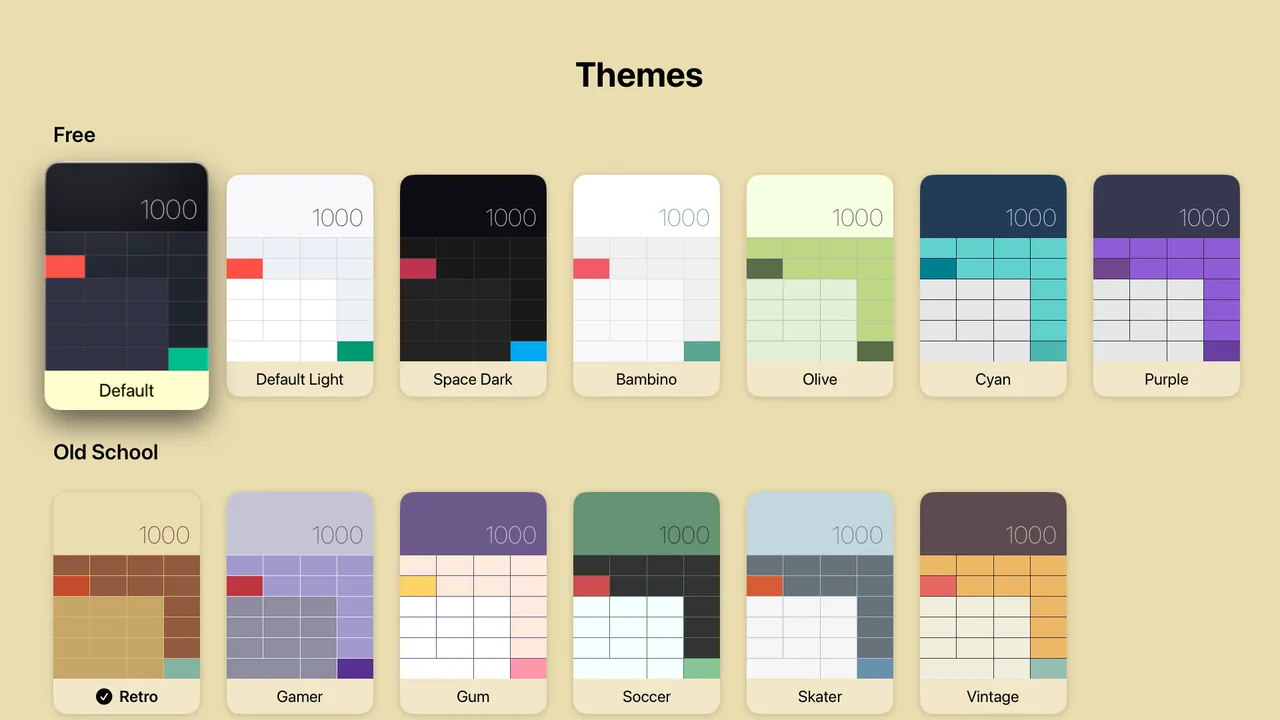
The same 49 themes, picked with the remote. 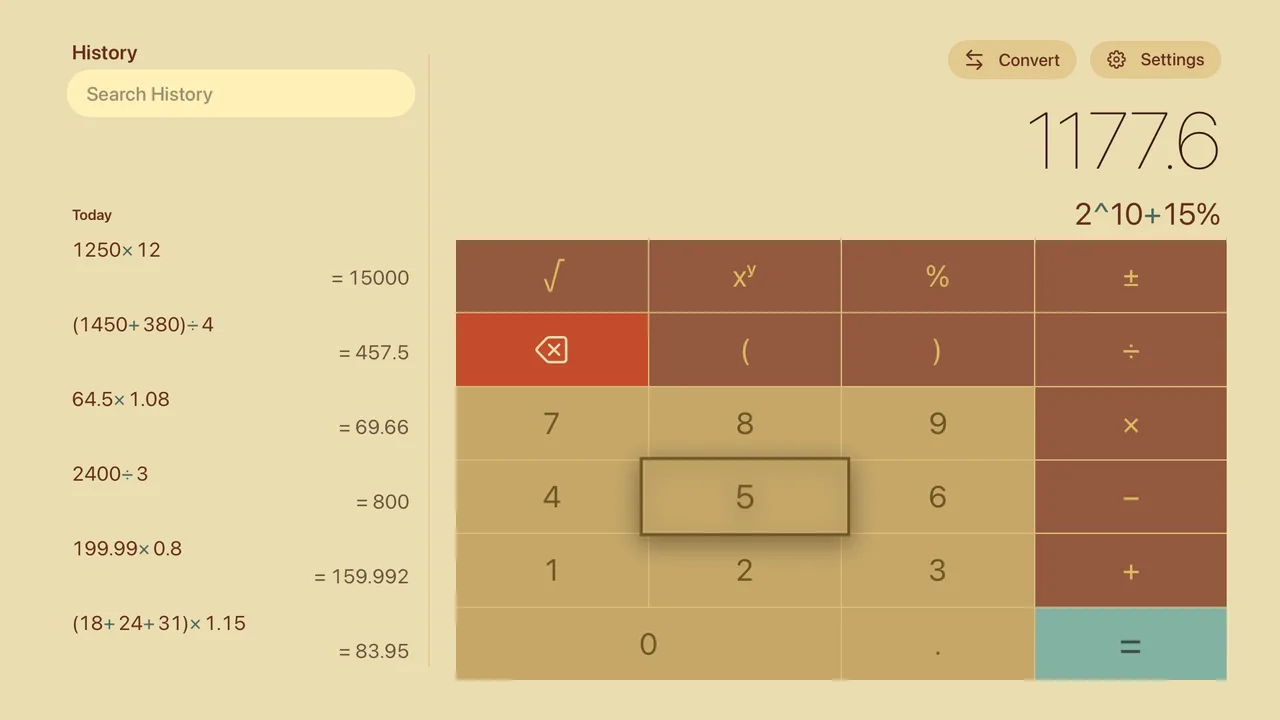
Retro. The theme you pick colors the whole screen.
Free, and staying that way.
Kalculator earns its place a different way. The frameworks that reach your project go through it first, so the sharp edges turn up on our schedule instead of yours.
That is the same reason Koombea builds and runs its own products. If you want the delivery model behind them, start with AI Pods.
Apple and the Apple logo are trademarks of Apple Inc., registered in the U.S. and other countries. App Store is a service mark of Apple Inc., registered in the U.S. and other countries.